nob.center Network Observability Backbone

See the domain risks your tools miss

Your domains can change in ways app monitoring never sees. nob.center watches Certificate Transparency logs to discover hostnames and certificates, then follows that evidence into DNS, certificate deployment, phishing lookalikes, and RDAP changes.

Discover cert logs reveal exposed names
Enrich DNS, RDAP, cert deployment
Act alerts, diffs, reports
Weekly report Score + findings
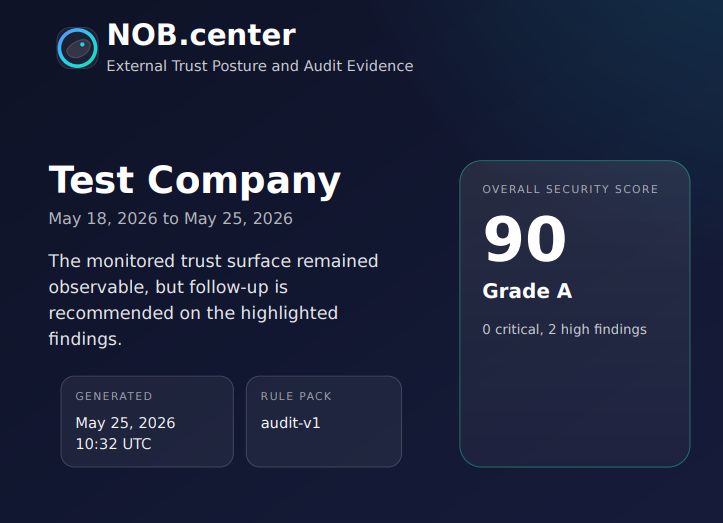
Weekly nob.center audit report showing an overall security score and highlighted findings
Weekly report: a simple score, highlighted findings, and follow-up evidence for the monitored domain trust plane.

Certificates expose what teams forget to monitor.

A new certificate can point to a forgotten staging host, a vendor-owned service, a phishing lookalike, or a production endpoint with weak deployment. nob.center connects those public signals into one monitored trust plane.

Read docs

The gap outside your stack

Your app metrics can look healthy while the public trust plane around it changes: certificates appear, DNS moves, nameservers shift, domains expire, and attackers register lookalike names for phishing.

Unknown or forgotten hosts

Certificate Transparency logs can reveal shadow IT, old environments, vendor-managed hostnames, and certificates issued outside your expected deployment path.

  • New hostname discovery from public certificate logs
  • Wildcard and SAN evidence for exposed services
  • Links into DNS and certificate deployment checks

Phishing and typo domains

Typosquatting means registering domains that look like yours: swapped letters, extra words, homoglyphs, or familiar phishing patterns.

  • Lookalike candidates for analyst review
  • Certificate-backed evidence when a site is being prepared
  • Signals for credential theft, vendor fraud, and abuse response

Drift that becomes takeover risk

DNS changes, stale CNAME targets, registrar movement, expiry changes, and weak or outdated certificates can all become control-plane failures.

  • DNS and RDAP snapshots with diffs
  • Certificate deployment checks and expiry tracking
  • Alert history for response and proof

How discovery becomes monitoring

Certificate Transparency shows what exists. The other modules explain whether it is expected, healthy, controlled, and safe.

1. Discover

Certificate Transparency logs

New certificates reveal hostnames, SANs, wildcards, issuers, and unexpected services tied to your domains.

2. Resolve

DNS monitoring

Discovered names move into DNS history so record drift, stale targets, CAA changes, and routing surprises are visible.

3. Verify

Certificate deployment

Live endpoints are checked for expiry, validity, fingerprints, and deployment weakness instead of trusting issuance alone.

4. Enrich

RDAP and lookalikes

Registration changes and typo-domain candidates add ownership and phishing context around the discovered asset map.

From finding to proof

Every discovery can become a monitored domain, snapshot, diff, alert, or report entry. That is useful during incidents, vendor reviews, board updates, and audits.

Start free

Reports turn noise into a decision

A score, findings, evidence, and recent activity help teams decide what needs attention without reading every certificate match, DNS snapshot, RDAP diff, or certificate scan by hand.

  • Explain what changed across certificates, hostnames, DNS, RDAP, and deployments.
  • Show whether findings are critical, high, medium, or informational.
  • Collect history that supports security reviews and audit requests.
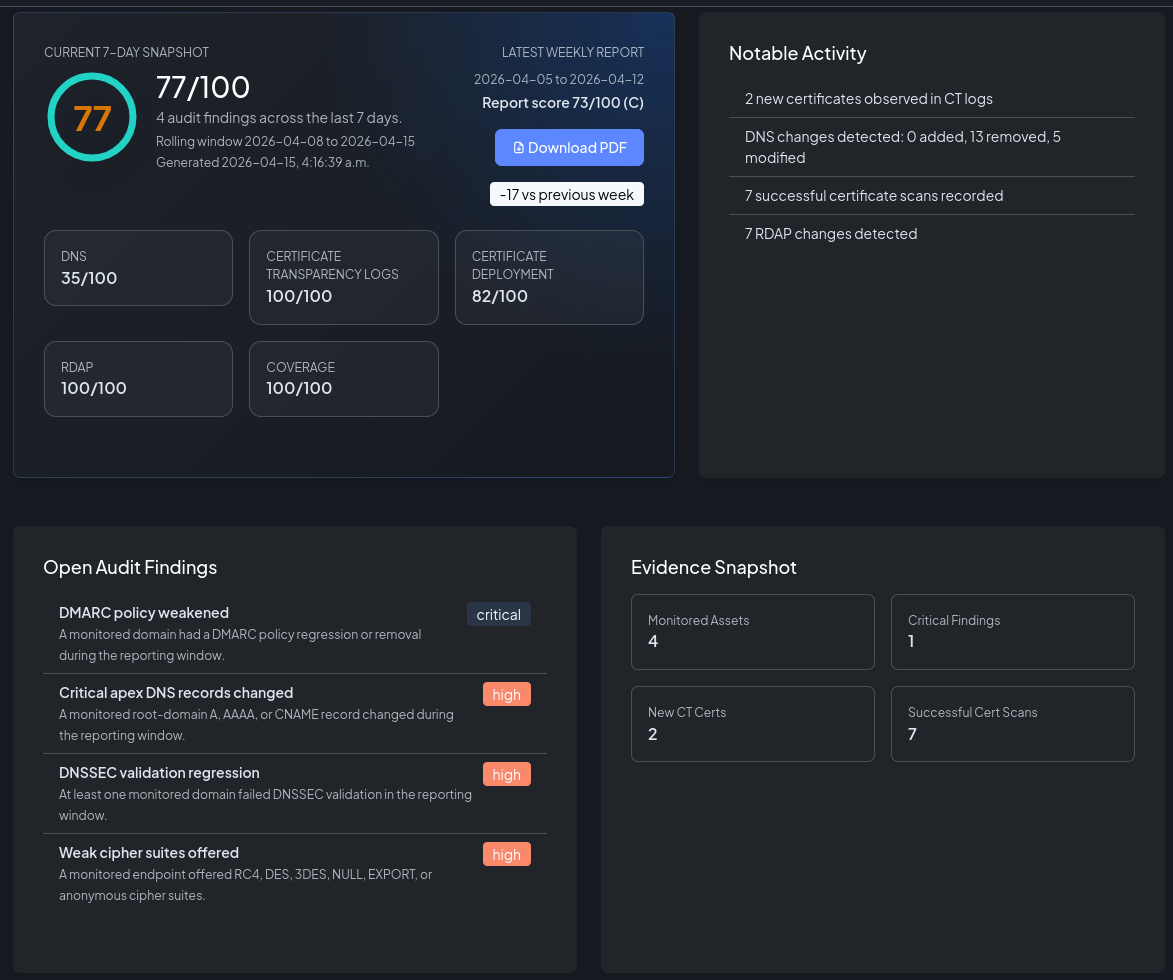
nob.center security overview report showing score, notable activity, open audit findings, and service coverage
Security overview: score, notable activity, service coverage, and open findings in one report view.

Useful in minutes, deeper when you need it

Start with one domain, use the preset rules, and expand monitoring where the evidence points. The docs walk through each module when you want more depth.

1

Add domains

Start Certificate Transparency monitoring for the domains that define your public trust boundary.

2

Use preset rules

Begin with useful defaults for new certificates, suspicious lookalikes, DNS drift, and expiry risk.

3

Promote findings

Feed important discoveries into DNS, certificate deployment, typo-domain, and RDAP tracking.

4

Alert and report

Use rules, diffs, weekly reports, API access, and history when teams ask what changed and when.

UI when you want speed, API when you want automation

Work from the app, send alerts to webhooks, or pull findings and snapshots into your own workflows. The documentation covers setup, rule examples, and API usage.

Open docs

Evidence from discovery to response

The product view follows the same story: certificate discovery first, then phishing review, certificate investigation, DNS and RDAP diffs, deployment checks, alerts, and reports.

Certificate Transparency matches table showing discovered hostnames and certificate evidence
Certificate discovery: find newly issued certificates and the hostnames they expose.
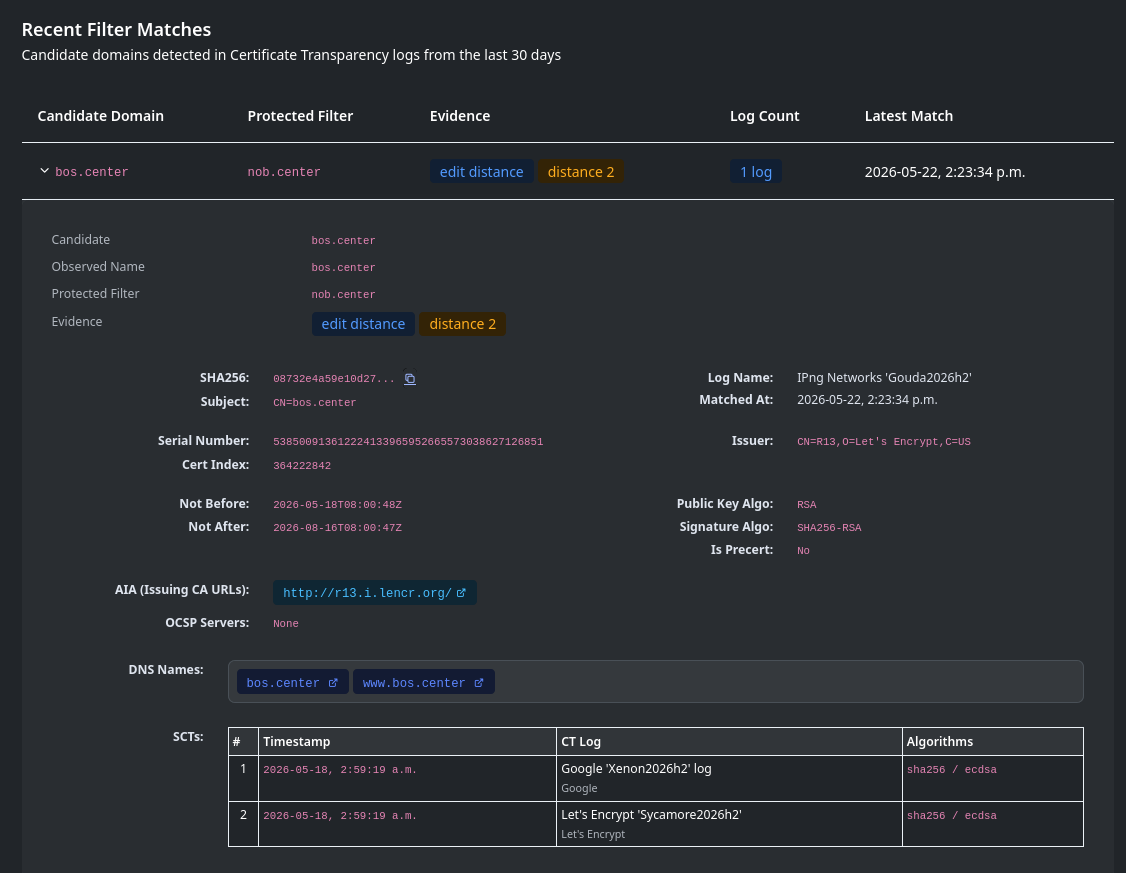
Typosquatting match detail showing suspicious domain evidence and similarity signals
Phishing review: similarity signals and evidence help analysts decide whether a lookalike domain is suspicious.
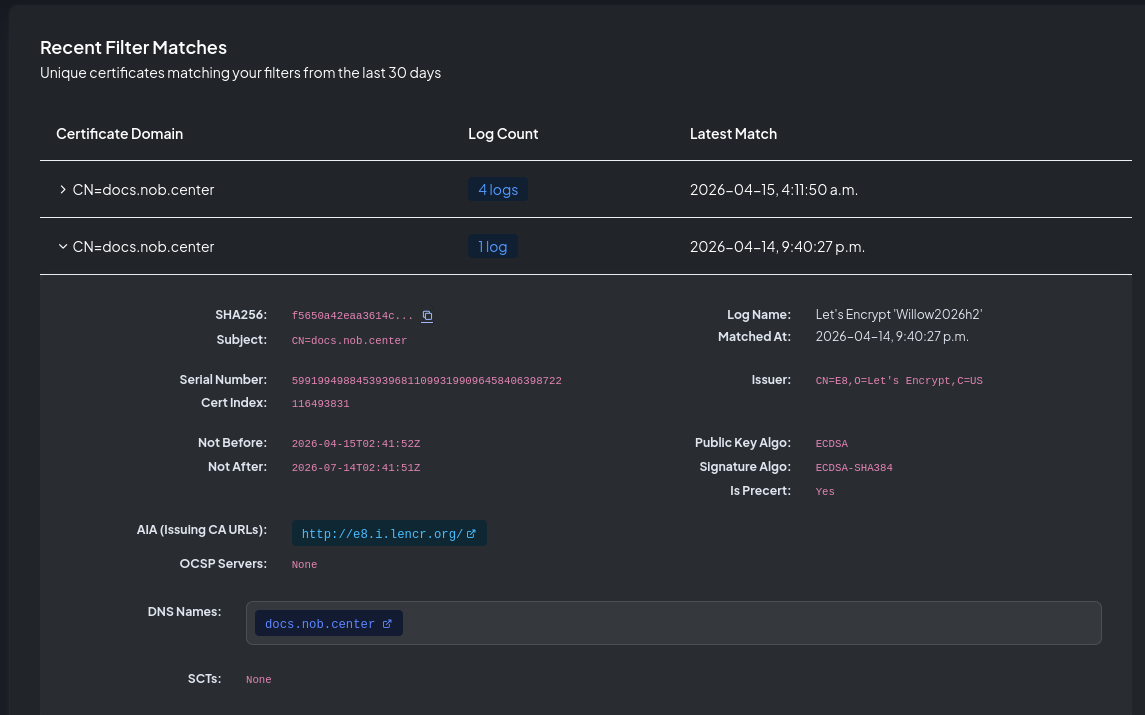
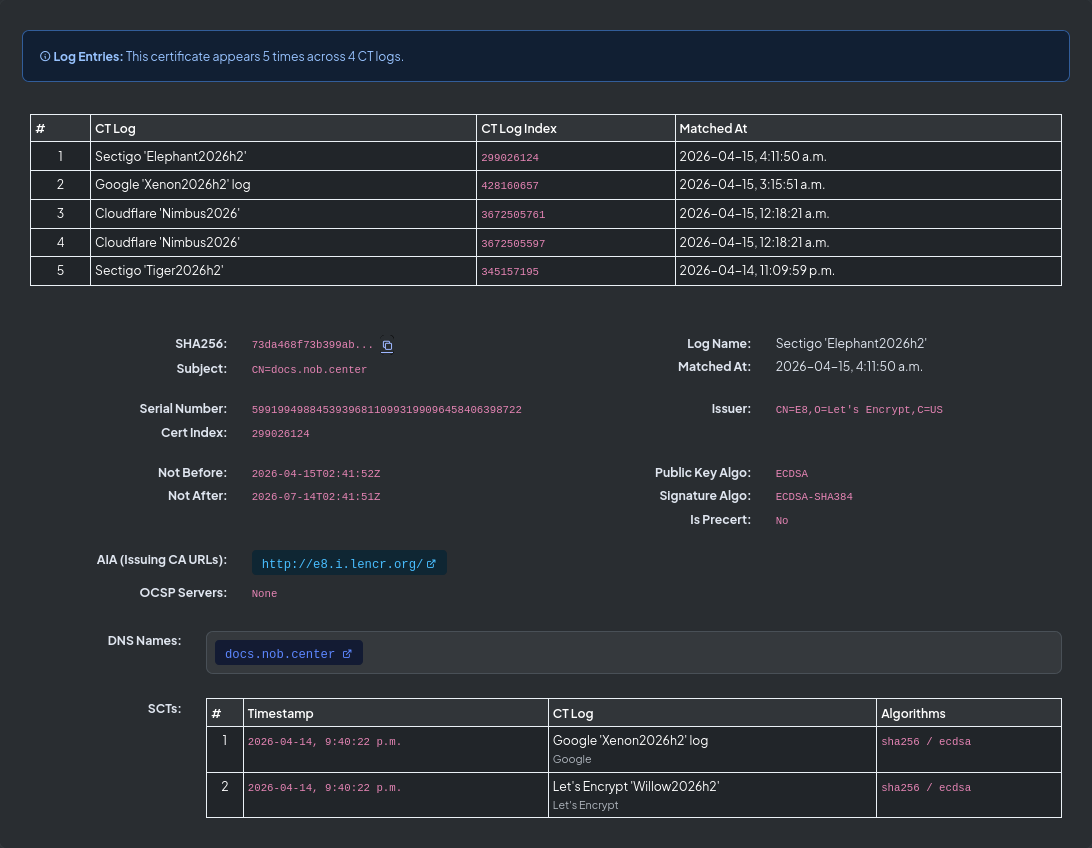
Certificate detail view showing certificate fields and monitored hostname evidence
Certificate details: inspect issuer, SANs, validity, fingerprints, and hostname evidence.
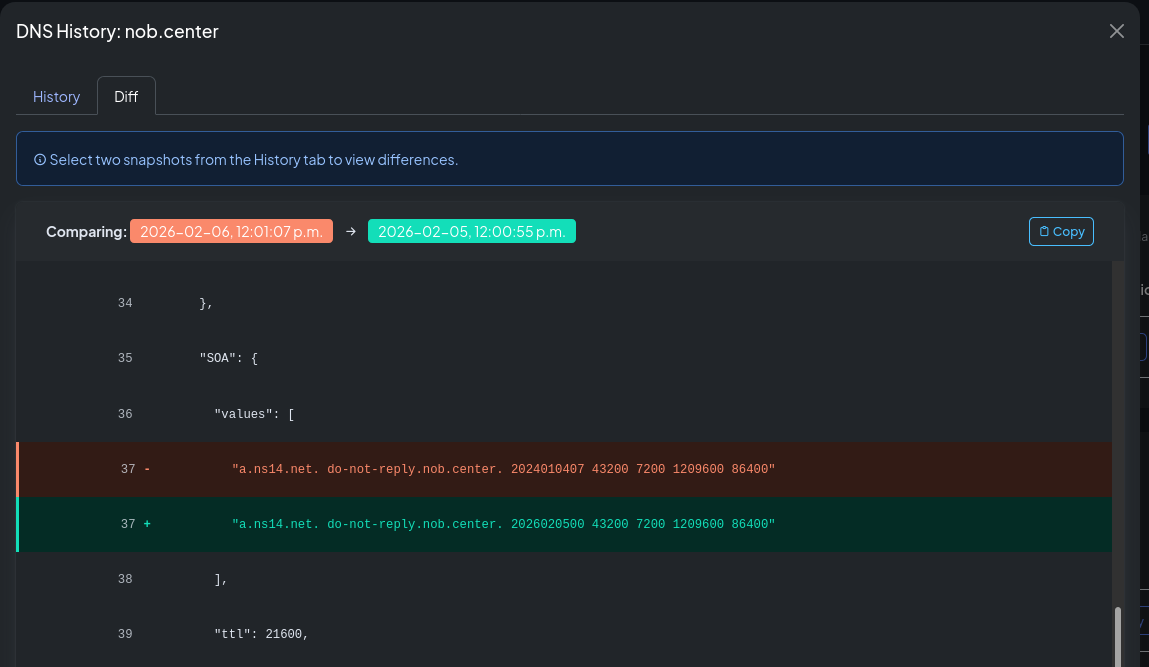
DNS history diff view showing changed DNS records for a monitored domain
DNS diffs: see exactly which records changed, were added, or were removed.
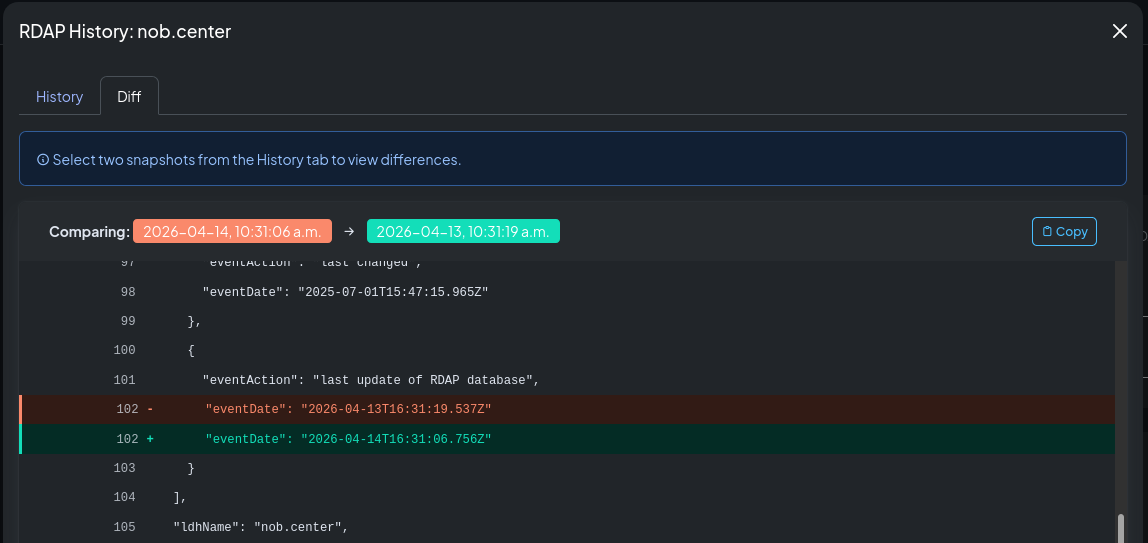
RDAP history diff view showing changed registration fields for a monitored domain
RDAP diffs: registrar, nameserver, expiry, and registration changes are preserved as evidence.
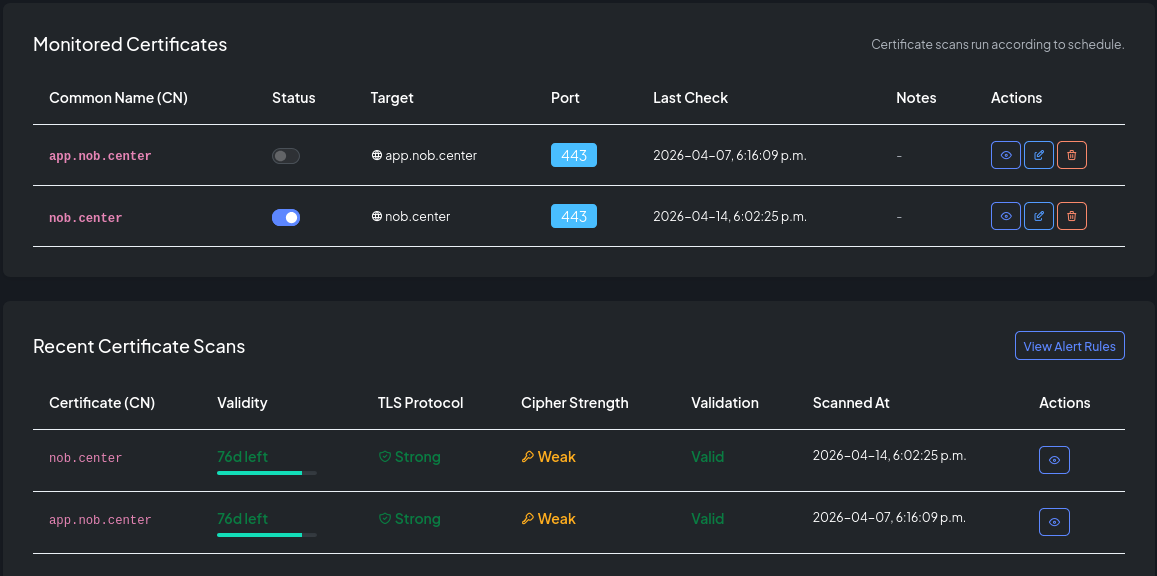
Certificate monitor detail showing deployed certificate status and recent scan results
Certificate deployment: track expiry, validity, fingerprints, and TLS-facing certificate changes.
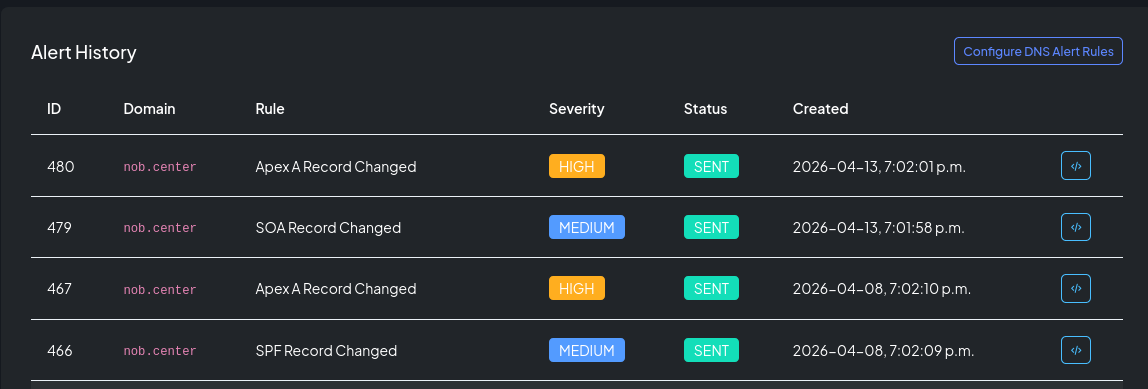
Alert history table showing domain alert severity, status, and creation time
Alert history: prove what fired, when it fired, and whether it was delivered.

Audit alignment without pretending to be a compliance platform

nob.center helps create monitoring evidence for common security frameworks by preserving external trust-plane history, alerts, diffs, and reports.

NIST 800-53

Supports configuration monitoring, system monitoring, and continuous monitoring conversations with concrete domain-change evidence.

SOC 2 CC7

Helps demonstrate monitoring of externally exposed systems and security-relevant events with alert history and reports.

ISO/IEC 27001

Supports configuration management and monitoring activities across DNS, registration, and certificate lifecycle changes.

Pricing

Start with one monitored domain. Upgrade when the trust plane gets bigger.

Free

$0/month

  • 1 seat
  • 1 domain per module
  • Phishing and typo-domain review
  • 1 alert template
  • Up to 5 alert rules
  • History, diffs, and API access
Create free account

Enterprise

RFQ

Tailored contracts for larger teams.

  • Custom domain limits
  • Dedicated support
  • SSO integration
  • Multi-organization management
  • SLA guarantees
  • Volume discounts
Contact sales

FAQ

Short answers for the first-minute decision.

What is typosquatting?

Typosquatting is when someone registers a domain that looks like yours, often for phishing. Examples include missing letters, swapped letters, extra words, or visually similar characters.

Is this brand monitoring?

It overlaps with brand protection, but nob.center focuses on technical trust signals: suspicious domains, certificates, DNS, RDAP, and deployed certificates.

What exactly do you monitor?

Certificate Transparency logs are the core discovery feed. From there, nob.center monitors DNS records, certificate deployment, phishing and typo-domain candidates, RDAP registration data, alerts, diffs, reports, and history.

Can this help with audits?

Yes. It is not a compliance suite, but it produces evidence: monitored assets, changes, alert history, reports, and the timeline behind a finding.

Is it API driven?

Yes. You can use the UI, define webhook targets with flexible authentication, or pull findings, snapshots, diffs, and alert history through the API. The documentation includes setup guidance and API examples.

Why does my invoice say Paddle?

Payments are processed by Paddle, our merchant of record. Paddle handles billing, tax calculation, and invoicing. nob.center never stores your payment details.

Monitor your first domain today

Create a free account, add a domain, and see the trust-plane baseline.